


Top 7 Best Free AI Tools for Students in 2026
7 best free AI tools for students in 2026- ChatGPT, NotebookLM, Perplexity, Grammarly, QuillBot, Wolfram Alpha & Knowt with honest free-tier limits explained.
Between lectures, part-time jobs, and a reading list that never seems to shrink, most students don’t need more apps they need the right ones. In 2026, AI tools have gone from a novelty to a genuine study advantage, but the challenge is knowing which ones are actually free versus which ones dangle a “free trial” before hitting a paywall on day three.
This guide covers seven AI tools for students with genuinely useful free tiers in 2026 what each one is actually good for, where the free plan stops and a paid upgrade begins, and how to combine them into a simple study workflow instead of turning your laptop into an AI junk drawer.
Why Students Are Using AI Tools More Than Ever in 2026
AI tools have moved past being a shortcut for lazy students and become something closer to a study partner that never gets tired. The best ones don’t just generate answers they help compress dense reading into notes, explain a stuck problem in plain language, and turn scattered lecture slides into something you can actually review before an exam.
The trick is matching the right tool to the right task. A great research assistant can still be mediocre at exam prep, and a strong writing checker won’t help you solve a physics problem. That’s why this list covers seven tools with genuinely different jobs, not seven versions of the same Chatbot.
What to Look for in a Free AI Study Tool
- No hidden daily caps that kick in after two or three uses
- Works from your own notes and textbooks, not just general internet knowledge
- Cites sources, so you can verify instead of blindly trusting the answer
- Doesn’t require a credit card just to start a “free” trial
Here Top 7 Best AI Tools for Students in 2026
- ChatGPT -(Visit Website)
ChatGPT remains the most versatile free AI tool for students, useful for brainstorming essay ideas, explaining a confusing concept in simpler terms, debugging code, and drafting a first pass of an assignment. The free tier requires a free account (no card needed) and covers roughly 10 messages every 5 hours on the standard model before automatically switching to a lighter fallback model until the window resets enough for most everyday academic tasks, though heavy daily use will bump into that cap.
Real world example: A second year psychology student in Leeds was stuck rewriting the introduction to a research paper for the fourth time. She pasted her rough notes into ChatGPT and asked it to restructure her argument into a clear thesis statement.
What would have taken her an entire evening of frustrated rewriting took fifteen minutes, and she used the rest of the night to actually finish the paper.
- NotebookLM- (Visit Website)
NotebookLM is one of the most underused tools among students in 2026, and arguably the most exam-friendly. Instead of pulling answers from the open internet, it only draws from documents you upload yourself lecture notes, textbook PDFs, or research papers which means it can’t invent facts about your specific course material.
The free tier (just a Google account, no card) allows up to 100 notebooks with 50 sources each, roughly 50 chat questions and 3 audio overviews per day generous enough that most individual students rarely hit the ceiling.
Real-world example: Before a biochemistry final, a pre-med student in Boston uploaded an entire semester’s worth of lecture slides into NotebookLM and asked it to summarize the three most tested enzyme pathways.
It generated a condensed study guide directly from her professor’s actual slides, and she used its audio overview feature to review the material as a podcast during her commute.
- Perplexity AI -(Visit Website)
Perplexity works like a research assistant that shows its work. Every answer comes with clickable source citations, which makes it far easier to verify a claim before dropping it into an essay a habit that matters just as much as getting the answer itself.
The free tier gives unlimited standard searches with citations, though the deeper “Pro Search” mode (used for more complex, multi-step research questions) is capped at around 5 uses per day.
Real-world example: A journalism student researching a piece on renewable energy policy used Perplexity to pull together recent statistics, then clicked through to the original government and news sources to confirm each number before citing them in her assignment catching one outdated statistic in the process that a plain chatbot answer would have missed.
- Grammarly -(Visit Website)
Grammarly’s free tier checks grammar, spelling, punctuation, and basic clarity issues in real time as you write, directly inside Google Docs, Word, or your browser. For students whose first language isn’t English, or anyone who writes essays late at night, it catches the small mistakes that are easy to miss during a tired final read-through.
Real world example- An international student in Toronto submitting his first English-language essay ran it through Grammarly before turning it in and caught eleven small grammar slips he’d missed on his own read-through, including a tense mismatch that changed the meaning of his entire conclusion paragraph.
- QuillBot-(Visit Website)
QuillBot’s free plan is built around paraphrasing and summarizing, which makes it useful for rewording a sentence that feels awkward without losing its original meaning, or condensing a shorter passage into plain language.
The free tier caps the paraphraser at 125 words per request with only two rewrite modes, but the summarizer accepts inputs up to about 1,200 words enough for an abstract or a few paragraphs, though not a full-length journal article.
Real-world example: Facing a reading list of twelve journal articles for one seminar, a sociology student ran each article’s abstract comfortably under QuillBot’s free 1,200 word summarizer limit to quickly judge which three were actually relevant to her essay topic, cutting a Three hour reading session down to under an hour.
- Wolfram Alpha- (Visit Website)
For anything involving numbers, Wolfram Alpha is still one of the strongest tools available, free or paid. The free tier gives you the correct final answer to most calculus, algebra, and statistics problems instantly.
Worth knowing the full step-by-step breakdown of how it got there now sits behind a paid Pro plan (roughly $5–12 a month), so if your goal is learning the method rather than just checking your answer, budget for that or pair it with a free alternative like Cymath for step-by-step algebra help.
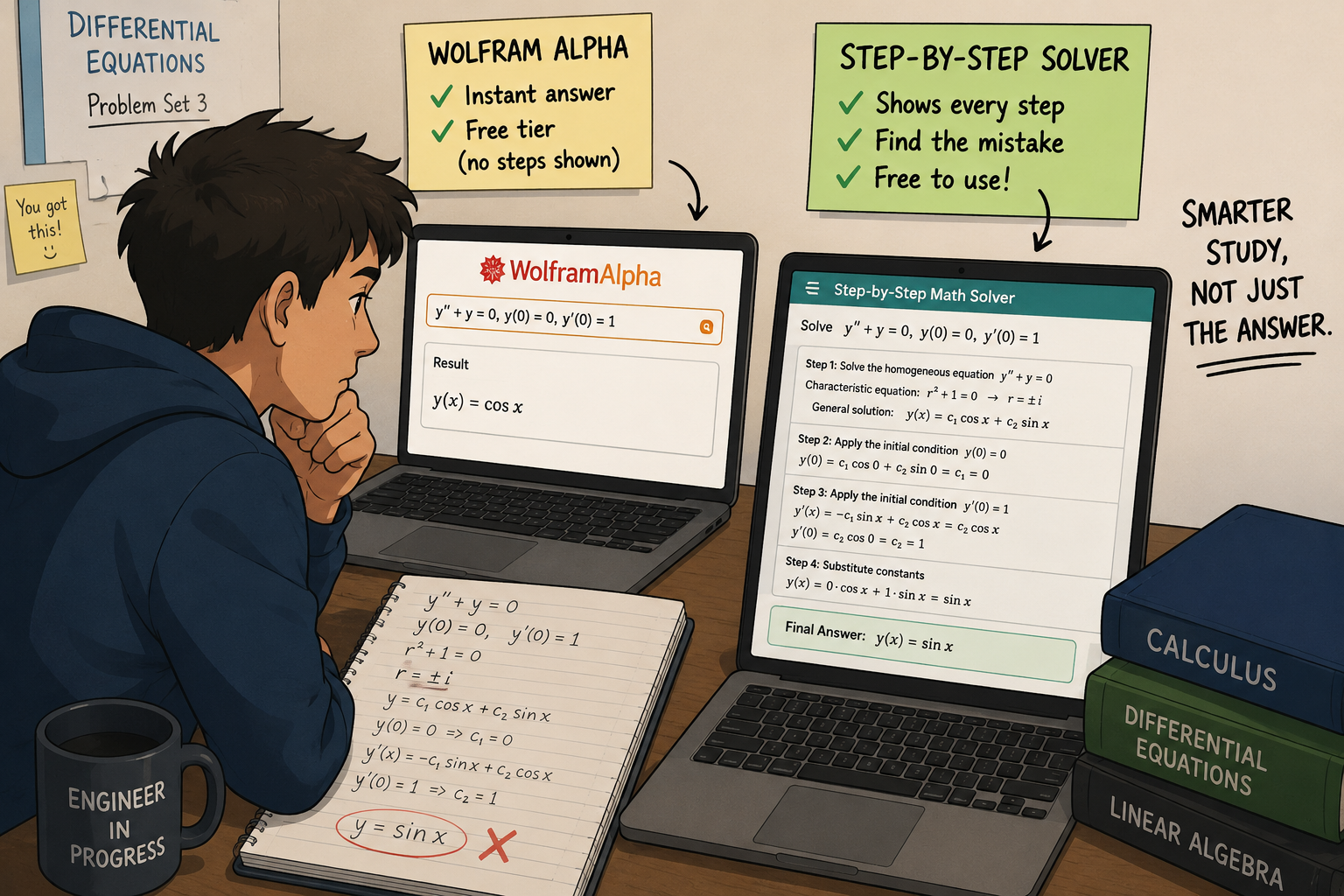
Real world example: A first-year engineering student stuck on a differential equations problem set typed the exact equation into Wolfram Alpha and got the correct final answer instantly on the free tier, which at least confirmed his own attempt was wrong.
To actually see where his working went off track, he switched to a free step-by-step alternative for that specific problem type instead of paying for Wolfram’s Pro plan just for one assignment.

- Knowt (AI Flashcard Generator) (Visit Website)
A quick correction worth flagging- Quizlet’s AI features (Magic Notes and its Q-Chat tutor) are often assumed to be free, but as of 2026 they actually sit behind Quizlet Plus the free Quizlet tier is limited to manually built flashcards and existing community decks.
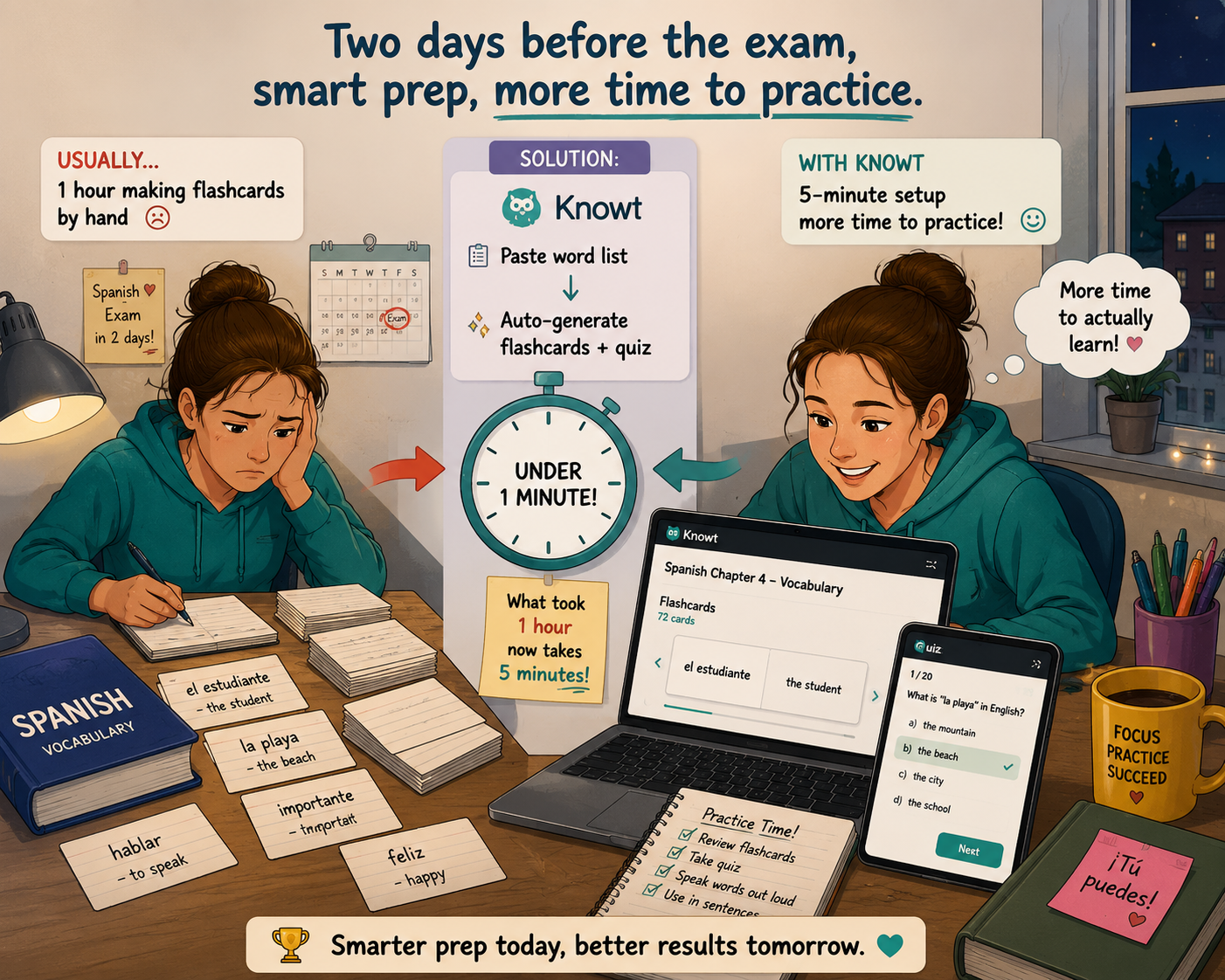
Knowt is a genuinely free alternative built specifically around AI flashcard generation paste in your notes or upload a PDF, and it creates a full flashcard deck and practice quiz automatically, with spaced repetition built in, at no cost.
Real world example- Two days before a Spanish vocabulary exam, a high school student pasted her entire chapter’s word list into Knowt, which auto-generated a full flashcard deck and quiz in under a minute turning what usually took her an hour of manual flashcard making into a five-minute setup, leaving more time for actual practice.

How to Combine These Tools Into One Study Workflow
Using all seven tools for every assignment is overkill. A simpler approach is to match each stage of your workflow to one tool:
- Brainstorm and draft ideas with ChatGPT.
- Study directly from your own lecture notes and PDFs with NotebookLM.
- Research facts and statistics with verified sources using Perplexity.
- Polish grammar and clarity in your final draft with Grammarly.
- Summarize long readings or reword awkward sentences with QuillBot.
- Check math and science answers instantly with Wolfram Alpha’s free tier (or step through the method with a free alternative if the paid Pro plan isn’t worth it for one assignment).
- Turn your notes into flashcards for exam revision with Knowt.
Most students only need two or three of these active at once pick based on what your current course actually demands, not all seven at the same time.
Using AI Tools Without Getting Flagged for Academic Dishonesty
AI tools are increasingly common in classrooms, but most universities still expect the final work and understanding to be your own. A safe rule of thumb use AI to explain, organize, and check not to write an assignment word-for-word and submit it unchanged. Always check your specific institution’s AI policy, since rules vary widely between schools and even between individual professors.
Frequently Asked Questions (FAQs for Top 7 Best Free AI Tools for Students in 2026)
Are these AI tools actually free, or do they require a credit card?
None require a credit card just to start using the free tier. Most of the free versions listed here ChatGPT, NotebookLM, Perplexity, Grammarly, QuillBot, and Knowt cover the majority of everyday student needs at no cost, though several cap advanced features (like Grammarly’s tone rewrites, QuillBot’s paraphrase length, or Perplexity’s Pro Search count) behind a paid upgrade or daily limit. Wolfram Alpha is the main exception: its free tier gives correct final answers, but the full step-by-step solution breakdown now requires a paid Pro plan.
Can teachers detect if I used AI tools for my assignment?
AI detection tools exist, but they aren’t perfectly reliable in either direction. The safer approach is following your specific school’s AI policy and using these tools to support your own understanding rather than to fully replace your own writing or problem-solving.
Which AI tool is best for someone who struggles with a specific subject like math?
Wolfram Alpha is generally the strongest option for getting a correct final answer to math and science problems for free. If you specifically need the full step-by-step breakdown to learn the method, that feature sits behind Wolfram’s paid Pro plan, so it’s worth pairing with a free step-by-step alternative for that particular need.
Do I need to use all seven tools to benefit from AI as a student?
No. Most students get the most value from picking two or three tools that match their specific coursework for example, NotebookLM for exam prep and Grammarly for essay polishing rather than juggling all seven at once.
Are AI tools reliable for citing sources in research papers?
Tools like Perplexity that show citations are a good starting point, but it’s still important to click through and verify the original source before citing it, since AI-generated summaries can occasionally misstate details from the source material.
Will these free AI tools still be free in the future?
Free-tier features and limits change often as companies update their pricing models, so it’s worth checking each tool’s current free-tier terms every few months rather than assuming today’s limits will stay the same indefinitely.
Conclusion
The best AI tools for students in 2026 aren’t the ones with the flashiest demos they’re the ones that solve a real, recurring problem: too much reading, not enough time, and a concept that just isn’t clicking. ChatGPT, NotebookLM, Perplexity, Grammarly, QuillBot, Wolfram Alpha, and Knowt each solve a different piece of that puzzle, and six of the seven cover everyday student needs without ever asking for a card number. Wolfram Alpha is the one exception worth knowing about upfront its free final answers are excellent, but the full step-by-step teaching feature is a paid add on.
Start with the one tool that matches your biggest current struggle whether that’s writing, math, or simply staying organized and build from there. AI can move you faster through a workload, but it works best as a tool you direct with a clear question, not one you hand your entire assignment to and hope for the best.
Also Read – Free AI Keyword Research tools without Login


